



Many of you have probably seen Mission: Impossible Ghost Protocol. In the film, Ethan Hunt and his team operate with no official backing, no support, and no traceable authority. If they fail, the government denies their existence meaning there’s no audit trail and no accountability.
That’s how AI agents operated before Microsoft Entra Agent ID. They often relied on shared service principals, embedded secrets, or borrowed user accounts powerful, but without a clear identity. In a world where agents can act on real enterprise data, that’s a major security gap.
Microsoft Entra Agent ID is an identity and security framework that extends the full power of Microsoft Entra to AI agents. It’s purpose-built for autonomous, assistive, and interactive AI systems that need to authenticate, access resources, and be governed at enterprise scale.
With Microsoft Entra Agent ID,
- Every agent gets its own first-class identity — like an official government ID for AI
- Blueprints act as templates — stamp out thousands of identical, pre-configured agents instantly
- Every token request, API call, and resource access is logged under the agent’s identity
- Conditional Access and Identity Protection policies apply to agents just like users
- Sponsors and owners ensure accountability. Lifecycle workflows ensure agents don’t retain access longer than needed.

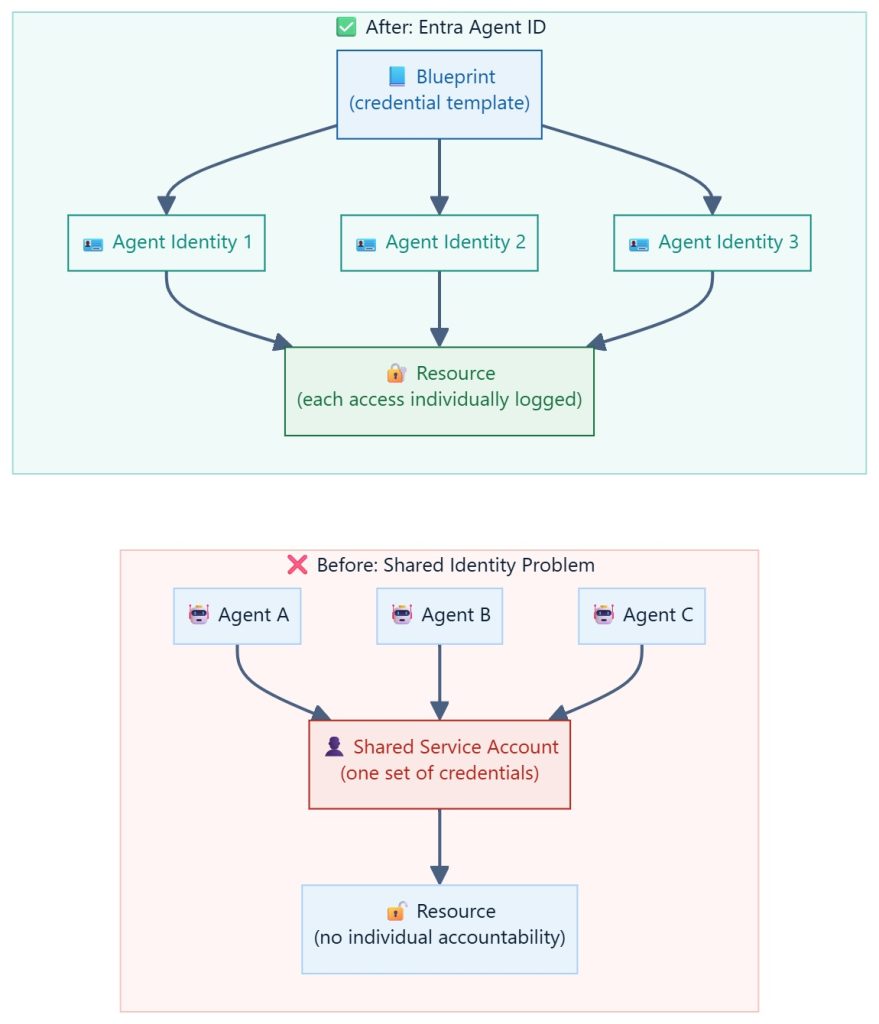
In this blog series, I’ll cover the nuts and bolts of Microsoft Entra Agent ID. Before we dive into the details, Part 01 will clarify a few key concepts.
Blueprint vs. Agent Identity — The Core Concept
This is where most people tend to get confused, so let me explain using a simple analogy.
Imagine I run a cookie business. I offer different types of cookies, and for each type, I use a specific cookie cutter. Customers place orders online — for example, you might order a pack of chocolate cookies.
Once I receive your order, I prepare the dough and use the appropriate cutter to shape the cookies before baking them. The purpose of using a cutter is to ensure consistency — every cookie has the same shape, size, ingredients, and decoration.
After baking, I package the cookies, assign a unique barcode for tracking, and ship them. When another customer orders the same type of cookie, I repeat exactly the same process.
Now, mapping this to the concept:
- The cookie cutter represents the Agent Blueprint — it defines the structure, shape, and configuration.
- Every cookie created from that cutter is identical in design, just like agents created from the same blueprint.
- However, once a cookie is baked, packaged, and assigned a unique barcode, it becomes individually identifiable.
- That barcode allows me to trace the cookie back to the specific customer or order.
This is similar to Agent ID.
Even though multiple agents are created from the same blueprint, each one gets a unique identity, making it traceable, accountable, and manageable.

Microsoft Entra Agent Identity Blueprint
The master template for creating agent identities. Backed by an App Registration in Entra ID. Defines the “type” of agent.
- Sets the identifier URI and OAuth scopes
- Holds the credentials (client secret or managed identity)
- Defines inheritable permissions (Graph scopes, app roles)
- Has a Sponsor (accountable person) and Owner (technical admin)
- Can generate thousands of agent identities
Microsoft Entra Agent Identity
An individual identity account in Entra ID for a specific running agent. Child of its Blueprint. First-class citizen in the tenant.
- Has a unique Object ID and Display Name
- Inherits permissions and scopes from its Blueprint
- Can be individually revoked or suspended
- Has its own sign-in logs and activity history
- Can be assigned its own Sponsor and Owner
Microsoft Entra Agent User Account (Optional)
A special Entra user account paired 1:1 with an Agent Identity. Used only when the agent needs a human-like presence (mailbox, Teams, etc.).
- Has a UPN like cs-bot-001@contoso.com
- Enables agent to send email, join Teams meetings
- Not required for most agent scenarios
- Maintains clear separation from real user accounts

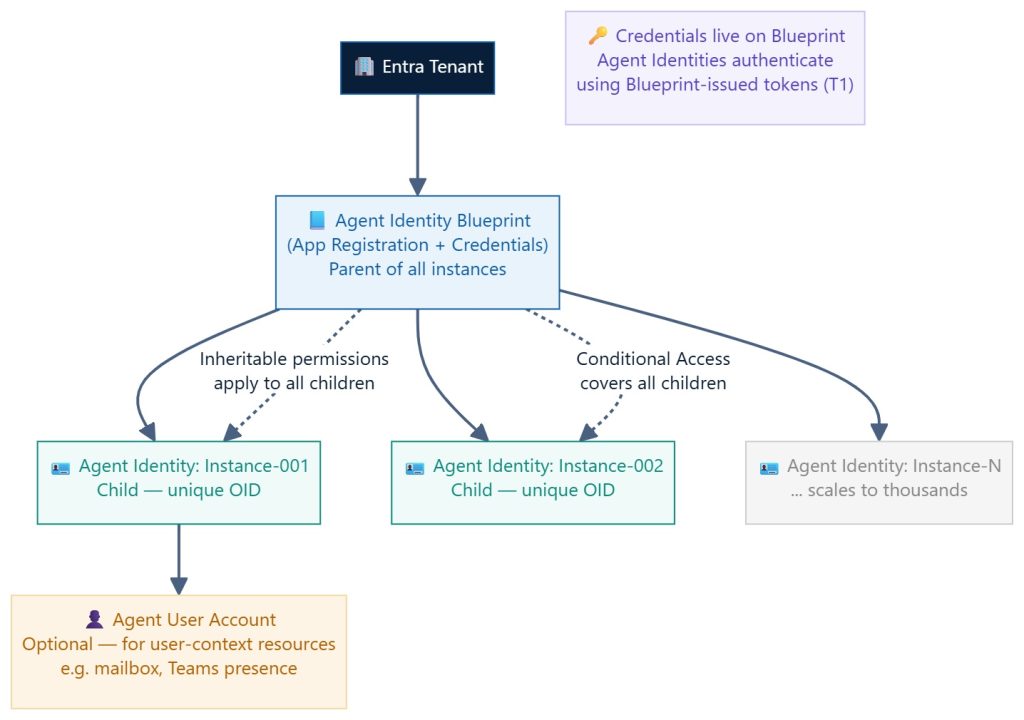
Blueprint Principal
Apart from above objects, Blueprint Principal also created when agent identity blueprint is created in tenant. Its tenant-level representation of the blueprint and allow blueprint to perform operations.

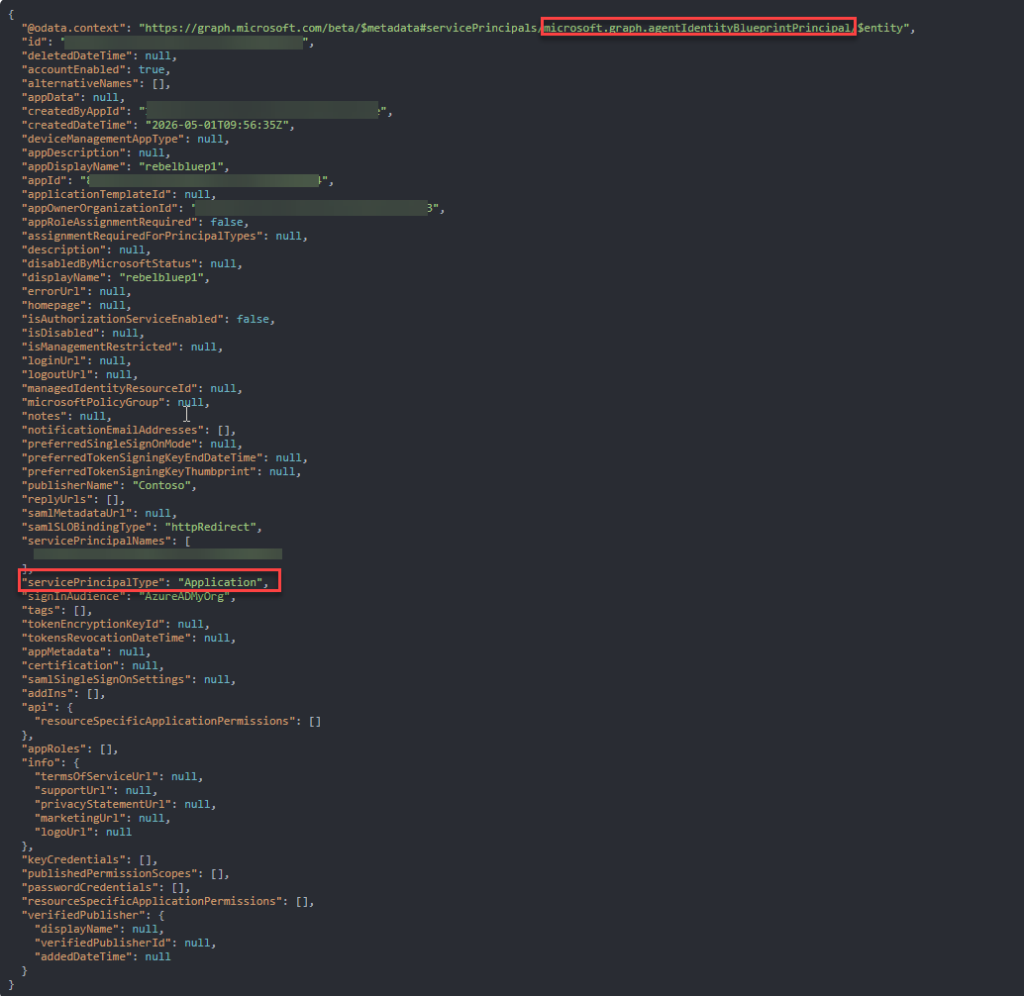
As you can see the blueprint is app registration but with special type microsoft.graph.agentIdentityBlueprintPrincipal with additional attributes.
The Three Authentication Flows
Entra Agent ID supports three distinct authentication patterns depending on who the agent is acting on behalf of and what it needs to access. Let’s go ahead and explore in details.
Autonomous App Flow — App-Only Access
The agent acts entirely on its own behalf with no user context. This is a two-stage token exchange. The Blueprint first acquires an intermediate exchange token (T1), then the Agent Identity presents T1 to Entra to receive the final resource access token (TR).

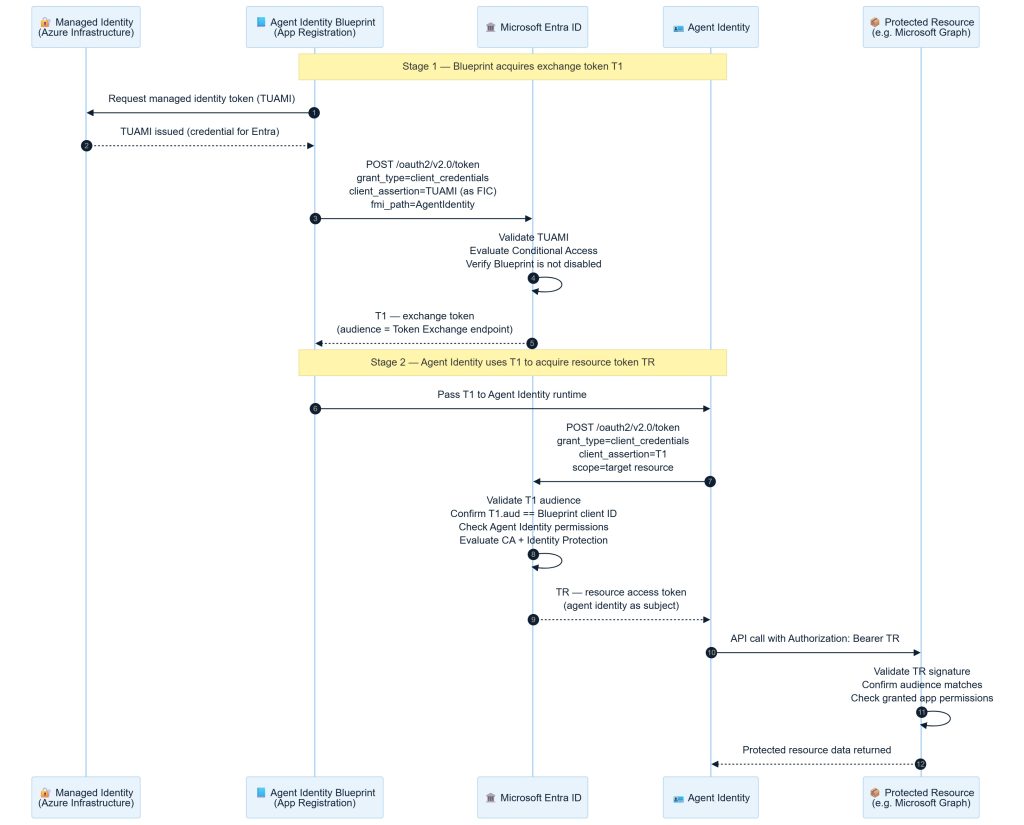
- Stage 1 starts with the Blueprint requesting the managed identity token for user assigned managed identity (UAMI). This only applicable if you are using managed identity for blueprint auth. Its also support secret and certificate authentication.
- Token for user assigned managed identity (UAMI) is issued.
- Agent Service POSTs to https://login.microsoftonline.com/{tenant}/oauth2/v2.0/token with grant_type=client_credentials, using the blueprint’s client_id and its credential (client secret, certificate assertion, or TUAMI). The critical extra parameter is fmi_path= — this tells Entra ID which agent identity the blueprint is acting on behalf of. Without this parameter you get a blueprint-scoped token, not an agent identity token. Scope is set to api://AzureADTokenExchange/.default.
POST /oauth2/v2.0/token
Content-Type: application/x-www-form-urlencoded

client_id     = {blueprint-appId}              #Blueprint's application (client) ID
scope         = api://AzureADTokenExchange/.default  #Fixed - exchange audience
fmi_path      = {agent-identity-appId}        #CRITICAL: which agent identity to target

# --- choose ONE credential type ---
client_secret          = {secret}                # dev/test only
# OR:
client_assertion_type  = urn:ietf:params:oauth:client-assertion-type:jwt-bearer
client_assertion       = TUAMI #cert / managed identity

grant_type    = client_credentials
- Entra ID validates the blueprint credentials.
- After validation, Entra ID returns T1 — an intermediate token. T1’s audience is api://AzureADTokenExchange. This is NOT a resource access token. It is a proof of authority token that proves Agent Service is authorised to request tokens for the specified agent identity. T1 is short-lived and never sent to a downstream resource.
- T1 is pass to the agent identity runtime to issue token exchange request.
- A second POST to the same token endpoint. This time client_id is the agent identity’s appId (not the blueprint’s), grant_type=client_credentials, scope is the actual resource (https://graph.microsoft.com/.default), and client_assertion_type=urn:ietf:params:oauth:client-assertion-type:jwt-bearer with client_assertion=. T1 serves as the credential proving the right to impersonate the agent identity.
POST /oauth2/v2.0/token
Content-Type: application/x-www-form-urlencoded

client_id             = {agent-identity-appId}            #Now the AGENT identity (not blueprint)
scope                  = https://graph.microsoft.com/.default #Target resource audience
client_assertion_type  = urn:ietf:params:oauth:client-assertion-type:jwt-bearer
client_assertion       = {T1-token}                           #T1 from previous request
grant_type             = client_credentials
- Entra validates that T1’s audience equals the Blueprint’s client ID— this is the enforced parent-child binding. A T1 from Blueprint A cannot be used by Agent Identity from Blueprint B.
- After validation Entra ID issue resource access token TR — the actual access token scoped to the target resource. TR‘s oid claim contains the agent identity’s object ID. The idtyp claim is app (application-only flow). This is the token will be sent to downstream resources.
- Agent Service presents TR as a Bearer token in the Authorization header when calling the downstream resource.
- The resource validates TR‘s signature (Entra public keys), checks audience, expiry, and then checks the agent identity’s RBAC role assignments (or app role assignments for Graph). Access is granted or denied.
- Agent has access to the relevant data from the resources.
Story
Let’s relate this to a real-world example to make it easier to understand.
It’s 2am. The office is empty. A RebelAdminCo security guard arrives to do a routine server room inspection.
- The guard shows their RebelAdminCo company badge at reception (Blueprint authenticates with its credential — T1 issued)
- Reception checks: “Is RebelAdminCo authorised to access the server room?” — yes, admin approved it
- Reception hands the guard a floor pass for the server room (TR issued to the Agent Identity)
- The guard enters and does the inspection — no employee involved at any point
The pass is logged against that specific guard’s ID, not RebelAdminCo as a whole. If RebelAdminCo is suspended, all their guards lose access immediately.
On-Behalf-Of (OBO) Flow — Interactive Agent
The agent acts on behalf of a signed-in user, using the user’s delegated permissions to access resources. This is a three-party flow: a user authenticates with a client application, the client passes the user token to the Agent Identity Blueprint, and the Blueprint + Agent Identity together exchange it for a resource-scoped token bound to the user’s identity. This requires user consent.

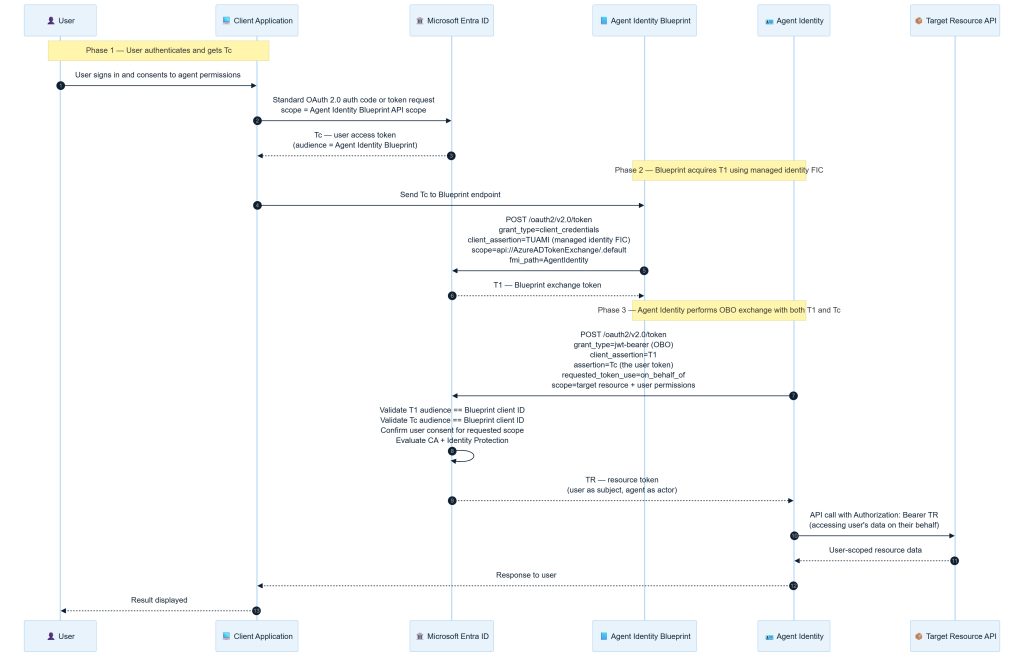
- Phase 1 is a standard OAuth 2.0 flow — the user signs in through the client application and consents to the agent acting on their behalf.
- The user is directed to Entra ID’s /authorize endpoint. The client_id here is the client app (not the agent identity). The scope must include api:///access_agent — this is the custom OAuth2 scope configured on the blueprint. It is what gives the resulting user token an audience that the agent API will accept. After consent the client receives an authorization code at the redirect URI.
- Tc –User access token is issued.The audience of Tc must equal the Agent Identity Blueprint’s client ID — this is what proves the user explicitly authorised this specific Blueprint to act on their behalf.
- Tc token is forwarded to the agent identity blueprint to act on behalf of the user.
- Step 5 and 6 covers Phase 2 of the configuration. It is identical to Stage 1 of the autonomous flow — the Blueprint uses its managed identity FIC to get T1. T1 is the Blueprint’s “proof of identity” token.
- Same as above.
- The agent API calls Entra ID’s token endpoint with grant_type=urn:ietf:params:oauth:grant-type:jwt-bearer, presenting Tc as the assertion. It also authenticates the blueprint using its own credentials (client_id=< agent-identity-appId >, client_secret or assertion). Scope is the target resource (https://graph.microsoft.com/.default). The key parameter requested_token_use=on_behalf_of signals OBO semantics.
- Entra performs a dual audience check: T1’s audience must equal the Blueprint client id and Tc’s audience must also equal the Blueprint client ID. Failing causes the exchange to be rejected.
- Entra ID validates both the user assertion and the blueprint credentials, then issues TR token. TR is a delegated token — the user is the subject; the agent is the actor. TR carries the user’s delegated permissions, not application permissions. The agent can only do what the user is permitted to do.
- The resource (e.g. Microsoft Graph) receives TR.
- Graph checks the scp claim (must contain the required delegated permission) and the agent identity’s app-role assignments. If either check fails, the request is denied. The agent physically cannot read data the user hasn’t consented to, even if the agent has broad app-level permissions.
- Pass the outcome to the user.
- Results displayed to the user.
Agent identities can inherit delegated permissions from their parent Blueprint when the InheritDelegatedPermissions property is enabled. This reduces consent complexity when multiple instances operate on behalf of users — permissions granted to the Blueprint flow to all child identities. Inheritance only works within the same tenant.
Story
Let’s relate this also to a real-world example to make it easier to understand.
It’s 10am. An employee, Tom, needs a confidential document from the legal vault — but he’s in back-to-back meetings. he authorises a RebelAdminCo guard to retrieve it on his behalf.
- Tom signs a proxy form at his desk — “I authorise this guard to access my documents today” (user token Tc issued)
- The guard goes to reception with two things: their RebelAdminCo badge (T1) and Tom’s signed proxy form (Tc)
- Reception checks both: “Is this guard from an authorised company? Yes. Did Tom actually sign this proxy? Yes. Is the document in Tom’s permitted access list? Yes.”
- Only then does reception issue a combined access pass (TR) that says: “Guard acting on behalf of Tom — legal vault only”
- The guard can only open doors Tom himself was allowed into — nothing more
If Tom had no access to the legal vault, the proxy form would be useless. The guard cannot exceed the employee’s own permissions.
Agent User Account Flow — User Context Without a Human
This method is used when the agent needs to operate with a persistent user-like identity — for example, to have a dedicated mailbox, send emails, or join Teams meetings — but no human user is signing in. This is the most complex flow: a three-stage token chain where the Blueprint impersonates the Agent Identity, which then impersonates the Agent User Account.

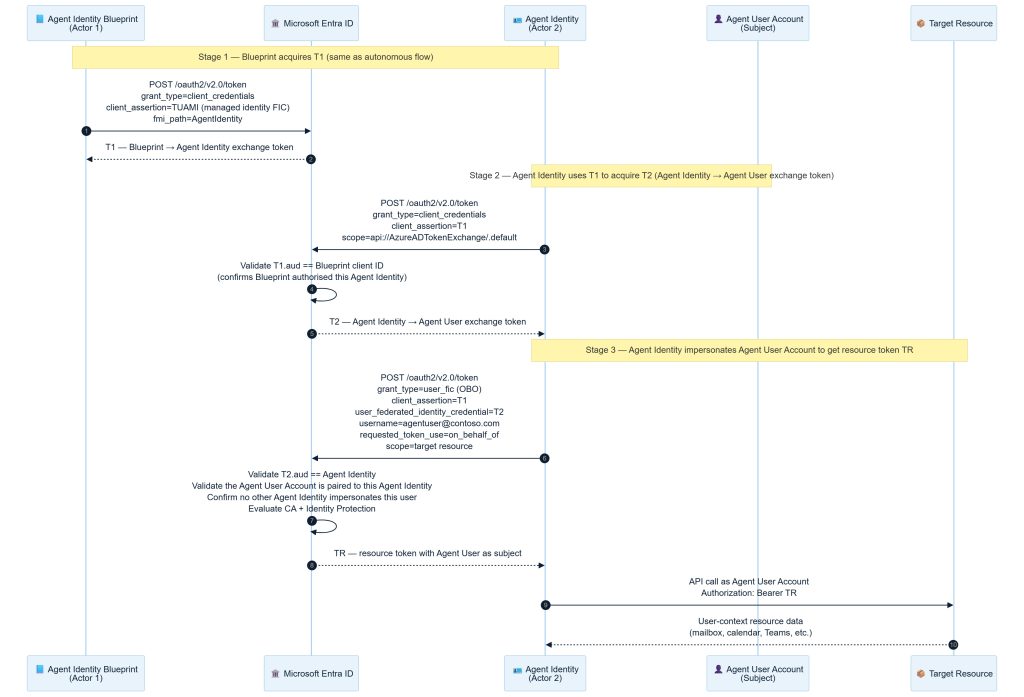
- Stage 1 is identical to the autonomous flow — the Blueprint authenticates with its managed identity FIC and receives T1
- Same as above.
- Stage 2 introduces T2: the Agent Identity uses T1 to prove it was authorised by its Blueprint.
- Entra validates that T1’s audience equals the Blueprint’s client ID— this is the enforced parent-child binding.
- Entra issues T2 as the Agent Identity’s credential.
- In Stage 3, the Agent Identity presents both T1 and T2 along with the Agent User Account’s username. Its OBO token exchange request and also target resource also mentioned as scope.
POST /oauth2/v2.0/token
Content-Type: application/x-www-form-urlencoded

client_id=AgentIdentity
&scope= https://abc.microsoft.com/.default #Target resource audience
&client_assertion_type=urn:ietf:params:oauth:client-assertion-type:jwt-bearer
&client_assertion=T1
&user_federated_identity_credential=T2
&username=agentuserA@contoso.com
&grant_type=user_fic
&requested_token_use=on_behalf_of- Entra validates T2’s audience equals the Agent Identity — this enforces the 1:1 pairing between Agent Identity and Agent User Account.
- TR is issued with the Agent User Account as the subject — the resource sees a user identity, not an application identity. This enables resources that require a user context (Exchange, Teams, SharePoint) to function correctly.
- Sends resources access request with TR.
- User context resource data access is granted.
Only use the Agent User Account flow when the target resource explicitly requires a user identity — for example, sending email via Exchange, or being added as a Teams meeting participant. For most data-access scenarios (files, lists, APIs), the autonomous or OBO flow is preferred and simpler.
Story
As other two flow, let’s relate this to a real-world example.
The company has a permanent AI assistant so embedded in operations it has its own named desk, email address, and Teams account — “Alex from IT Support.” External vendors email Alex, meetings are booked with Alex, tickets are raised by Alex.
When the AI agent needs to send an email as Alex, it can’t just show up and claim to be Alex. Reception requires three credentials in sequence:
- RebelAdminCo master authorisation — proves the AI agent was deployed by the right company (T1)
- This specific guard’s mandate — proves this AI agent, not any other, is assigned to the Alex identity (T2)
- Alex’s identity card + the username — proves the AI agent is now acting as Alex specifically
Only after all three does reception issue a pass in Alex’s name. This three-step chain exists because Alex’s account has a real mailbox, real Teams presence, real calendar — and the company must be absolutely certain that only one specific AI agent ever acts as Alex.
This brings us to the end of this blog post. I hope you now have a clearer understanding of Entra Agent ID, its fundamentals, and how its authentication flow works. Stay tuned for the next post, where I will explore the implementation of blueprints and agent identity in more detail.